


Flightradar24 Flight Tracker
4.516.09K Reviews
App Specs
- Version
- Varies with Device
- Updated On
- License
- Free
- Downloads
- 100,000,000+
- Developer
- Flightradar24 AB
- Categories
- Travel & Local
- Platform
- Android, iOS
Screenshots


 Analysis by AppCompare
I use Flightradar24 Flight Tracker less like a travel planner and more like a live window onto the busy, often invisible system above us. It turns a passing aircraft from a vague speck into something I can investigate, and that simple shift is what makes it enjoyable. It is a free travel and local app from Flightradar24 AB, rated for Everyone, and it has grown into a familiar tool for curious onlookers as well as aviation fans.
What the live map is best at
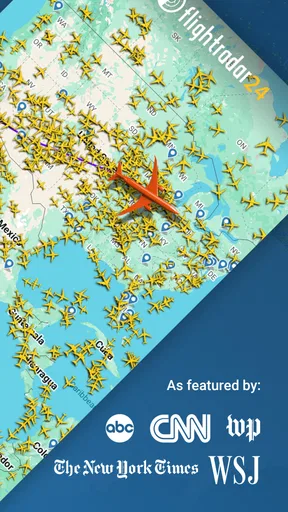
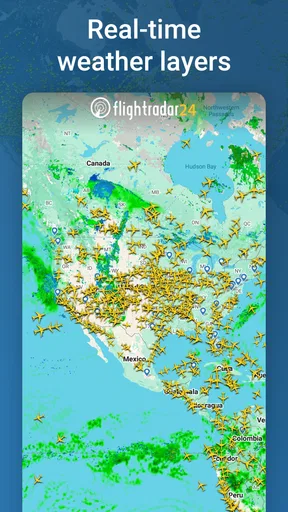
The map is the natural place to start: aircraft symbols make activity around an airport or across a region easy to grasp at a glance. I find it more useful when I have a question in mind than when I simply leave it open. Tap a flight to examine its route and aircraft details, then zoom out to see how that one journey fits into the wider stream of traffic. That little habit makes the display feel less like a wall of moving icons and more like a way to follow a specific story.
For someone meeting a passenger, the practical question is usually not “What is flying over me?” but “Has this particular flight actually moved?” A live tracker can help you check progress before setting out, while the airport view gives a broader sense of arrivals and departures. I would still treat it as a helpful reference rather than a promise that plans will unfold exactly as shown: airport conditions and schedules can change, and a map is not a substitute for checking directly with the airline when timing matters.
Guides and Analysis on Flightradar24 Flight Tracker
Making sense of aircraft overhead
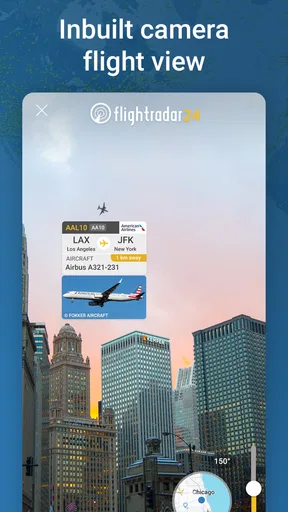
The augmented-reality view is a particularly satisfying way to connect the screen to the sky. When I hear an engine and cannot tell where it is coming from, pointing the phone upward can help identify the aircraft shown in that direction. It is a fun shortcut for casual curiosity, but it works best when I have a clear view and enough patience to line up what I see on the display with what is overhead. If the sky is busy, or several aircraft are nearby, the feature can be less decisive than the simple novelty first suggests.
A useful trick is to use the map first, then switch to the sky view once I have a likely target. That gives me context instead of asking the camera-style view to solve everything on its own. It also makes the app more approachable for a first-time user: find a flight on the map, inspect its details, and then see whether the overhead view helps identify it. The experience is most rewarding when those views answer one another, rather than when I expect either one to be perfect in isolation.
Following a flight without getting lost in the map
There is a learning curve to a screen full of aircraft, especially near a major airport. I recommend starting with a location you know well, selecting one aircraft, and following its route rather than trying to interpret every symbol at once. The map becomes easier to read when I pay attention to the selected flight and use the surrounding traffic as context. This is also a good way to explain the app to a friend: choose one plane and see where it is going, instead of handing over the phone with no starting point.
Looking back at earlier journeys
Playback adds a different kind of value because it lets me revisit movement after the moment has passed. That is handy when I want to understand a route or compare what happened around an airport at different points in a day. It can also turn a weather disruption into something easier to follow: rather than relying on a single snapshot, I can look at how traffic moved over time. For aviation enthusiasts, that makes the app useful beyond live spotting, though it is still a visual way to explore rather than a full analysis tool.
Worth Reading Before You Choose

QuizzLand Review: A Good Fit for Short Trivia Breaks, Not Every Player

Basketball Stars: Multiplayer Is Fast, but Can It Recover When Matches Go Wrong?

Link to Windows Runs on Shared Habits, Not Social Feeds

How Alibaba.com Dominates the B2B Marketplace

Metro's Quiet Rise: Redefining Mobile Communication

Harnessing Ecosystem Power with Phone Tracker by Number
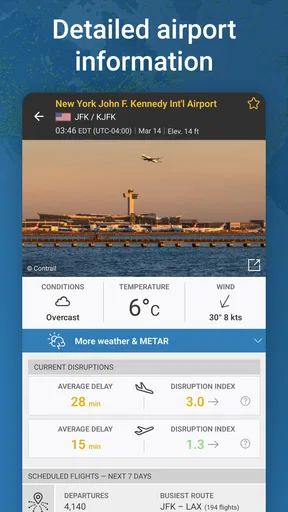
Airport pages are useful when my interest is local and practical. Arrivals and departures help me see the shape of activity at a particular airport, while the weather and delay information adds context to what is happening there. I like that I can move from an individual aircraft to the airport around it without treating them as separate tasks. If I am simply checking a passenger’s status, though, I would avoid reading too much into a delay indicator alone; the airline remains the better place for decisions about a booking.
Free access and the point of paying
The app is free to install, and its basic experience gives newcomers a real taste of flight tracking rather than only a teaser. Optional in-app purchases range from $1.49 to $64.99 per item, so I would decide based on how often I use the deeper tools, not on the assumption that every aviation fan needs an upgrade. Paid options can add things such as more aircraft history, extended flight details, and weather layers. Those are appealing if I regularly compare flights or study aviation activity; for occasional checks and casual sky-watching, I would begin with the free version.
That distinction matters because a feature can be interesting without being essential. If I only open the app when a plane catches my eye, extra historical depth may not change my routine. If I am following flights often, exploring aircraft or using the map as a hobby, the added context can make it easier to stay engaged. I would spend time with the free app first and notice which questions I keep wanting to answer before paying for tools aimed at those questions.
Where it fits among travel apps
Compared with a standard airline or airport app, this is better for seeing aircraft movement across a map than for managing a booking. It is not where I would go first to change a seat, confirm baggage rules, or resolve a reservation issue. A general map app is more useful for getting to the terminal, while an airline’s own app is usually the sensible choice for official trip updates. Flightradar24 fills a different gap: it helps explain what is happening in the air and around an airport, which can make waiting or watching more interesting.
There are trade-offs. A dense map can feel busy, and a displayed flight path is easier to enjoy than to interpret if I am unfamiliar with aviation. Live information is compelling, but it can encourage needless refreshing when I am waiting for a passenger and already have the details I need. The app also makes its strongest case to people who enjoy looking at aircraft or understanding flight activity; if I want a simple itinerary organizer, I would choose a travel-planning tool instead.
Who will get the most from it
I would recommend it to plane spotters, aviation hobbyists, and anyone who has ever watched a jet cross the sky and wondered where it came from. It also suits occasional practical checks, such as seeing a flight’s progress before leaving to meet someone, as long as I use the information as context rather than a guarantee. Parents or curious travelers can use the map to make a long wait more engaging by following a plane’s journey, while a frequent traveler may enjoy understanding airport traffic beyond their own itinerary.
It is a less natural fit for people who only want official booking support or who find live maps distracting. The app is available on Android with a minimum operating system requirement of 8.0, and it has been on the market since September 15, 2010. Its 4.5 average from around 634,000 ratings, 16,000 reviews, and more than 100 million installs suggest broad appeal, but popularity does not make it necessary for every traveler. I would install it for curiosity or flight awareness, not as a replacement for the airline app I rely on for travel decisions.
What I would watch as I use it
One sensible way to judge whether it belongs on your phone is to notice what you return for: quick arrival checks, identifying aircraft, revisiting routes, or exploring airport activity. Those are different habits, and each puts a different value on the map and its extra layers. If I mainly want to know whether someone has landed, I keep the check brief and verify important plans with the airline. If I am exploring for pleasure, I can take my time with the route and playback instead.
App versions can change over time, so I would look at the current feature and purchase details before deciding whether to upgrade. The app’s release history stretches back to 2010, but that alone does not tell me which specific changes a particular update introduced. What matters to me as an existing user is whether the current map remains easy to read, whether the tools I rely on are still available in the way I expect, and whether an added feature solves a real problem rather than simply adding more detail to an already busy screen.
First impressions
When you first fire up Flightradar24, it feels like you’ve unlocked a secret window into the aviation world. The app is sleek and user-friendly, with an interface that’s as smooth as a well-flown landing. You’ll be greeted by a map bustling with real-time flight data. It’s like a digital tapestry of planes soaring across the globe, and let me tell you, it’s downright mesmerizing.
Features that soar
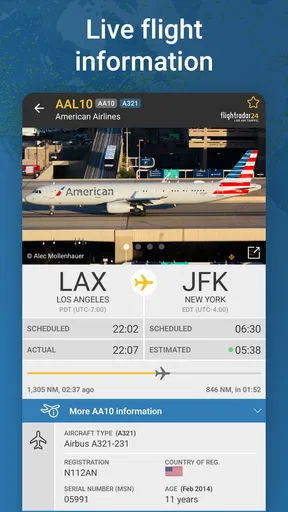
One of the things that struck me was the sheer range of features packed into this app. You can literally see every flight taking off and landing in real time. Tap on a plane icon, and boom, you get details like aircraft type, altitude, speed, and even the aircraft’s route. It’s like having a mini air traffic control center right on your phone. And for aviation enthusiasts, this is pure gold.
Now, let’s talk about the augmented reality (AR) feature. Just point your device at the sky, and it’ll identify planes flying overhead. Seriously, it’s like something out of a sci-fi movie! You can be lying in your backyard, pointing your phone up, and suddenly you’re a flight detective. It’s perfect for those moments when you hear a jet engine and wonder which airline it belongs to.
Digging deeper
Diving deeper into the app, we find the playback feature. It allows you to replay past flights, which is not only fun but also educational. Want to know how that crazy storm affected flight paths last week? Just rewind and watch the reroute magic unfold. It's a great tool for aviation geeks and anyone curious about flight patterns.
Another cool feature is the detailed airport information. You get live updates on arrivals and departures, weather conditions, and even delays. It’s like having a little bit of the airport in your pocket, minus the overpriced coffee.
Subscription perks
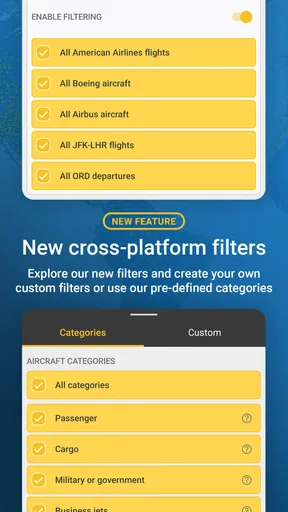
While the free version of the app is pretty robust, upgrading to a premium subscription unlocks even more features. Think detailed aircraft history, extended flight data, and even weather layers on the map. It’s definitely worth considering if you’re a frequent flyer or just seriously into aviation.
Usability and performance
In terms of performance, the app runs smoothly without any noticeable hitches. It’s quick to update and refresh, ensuring the data you’re seeing is as real-time as it gets. The user interface is intuitive, so even if you’re not tech-savvy, you’ll find it easy to navigate. The visual design is clean, focusing on functionality, which I appreciate because it makes the experience straightforward and enjoyable.
Final thoughts
All in all, Flightradar24 Flight Tracker is a gem for anyone with even a passing interest in aviation. Whether you’re tracking a loved one’s flight or just indulging your inner aviation geek, this app delivers. It’s comprehensive, reliable, and just plain fun to use. So next time you’re wondering about a plane overhead, whip out this app and satisfy that curiosity. Who knows, you might just find yourself hooked, scanning the skies more often than you’d like to admit!
Pros
- Real-time flight tracking worldwide.
- Intuitive and user-friendly interface.
- Detailed flight information available.
- Customizable alerts for flight updates.
- Supports both Android and iOS devices.
Cons
- Requires internet for real-time updates.
- Free version has limited features.
- Can drain battery quickly.
- Some ads in the free version.
- High data usage for live tracking.
FAQs for Flightradar24 Flight Tracker
What features does Flightradar24 Flight Tracker offer?
Flightradar24 Flight Tracker provides real-time flight tracking with comprehensive details about flights worldwide. Users can view detailed flight status, aircraft information, and even get 3D views of airplanes in flight. The app also includes historical data, flight alerts, and airport information, making it an essential tool for aviation enthusiasts and frequent flyers.
Is Flightradar24 Flight Tracker free to use?
Flightradar24 offers a basic free version, allowing users to track flights in real time. However, for advanced features like accessing historical data, detailed flight alerts, and additional aircraft details, users can opt for a subscription plan. These premium features enhance the overall experience and provide more in-depth information.
How accurate is the flight tracking on Flightradar24?
Flightradar24 is highly regarded for its accuracy, utilizing a network of over 20,000 ADS-B receivers globally. This network helps provide real-time flight information with precise tracking capability. However, some regions might have limited coverage, which can affect tracking accuracy. Overall, it is one of the most reliable flight tracking apps available.
Can I use Flightradar24 offline?
Flightradar24 requires an internet connection to provide real-time flight data and updates. While you can view previously downloaded information without connectivity, accessing live flight tracking and updates is not possible offline. It's recommended to use the app with a stable internet connection for the best experience.
What devices support Flightradar24 Flight Tracker?
Flightradar24 is available on both Android and iOS devices, offering a seamless experience across smartphones and tablets. The app is optimized for various screen sizes, ensuring users can enjoy tracking flights on any compatible device. Regular updates ensure compatibility with the latest operating systems.


